
Cardlytics-Built Dynamic Widget
This guide walks you through integrating the Cardlytics-Built Dynamic Widget into your web or mobile app using the Hosted full CRP experience.
The Dynamic Widget is a two-part integration:
- The widget itself is rendered by the Cardlytics Embedding SDK (a JavaScript library you load into your page). It surfaces personalized rewards directly inside your existing UI as a small, embeddable module — for example, a horizontal carousel of offer cards.
- The full Cardlytics Rewards Program (CRP) is the Hosted experience — a Cardlytics-built page that lives on your own domain. When a user taps an offer, "How it works", or "See all offers" inside the widget, the SDK opens the hosted full CRP (in a new page on web, or a separate webview on mobile) and deep-links to the right screen using a forwarded
contextpayload.
In short: the SDK powers the embedded widget, and the widget acts as an entry point into the hosted full CRP.
Table of Contents
- Overview
- User Flow
- Server Setup
- Web Integration
- Mobile App Integration
- Theme Selection
- Appendix: Hosted Full CRP Page
Overview
The Dynamic Widget supports two states:
- Logged-out mode — Shown when the user is not authenticated, or when an error happens inside the widget. Displays a banner that triggers your authentication flow when tapped.
- Logged-in mode — After authentication, the widget renders the template you choose (for example,
horizontal-carousel) with personalized offers. Tapping an offer opens the full CRP in a separate webview/page.
| Logged-out mode | Logged-in mode (template: horizontal-carousel) |
|---|---|
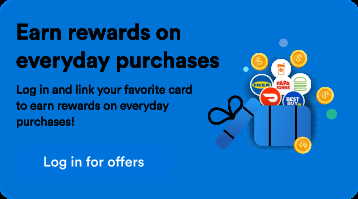 | 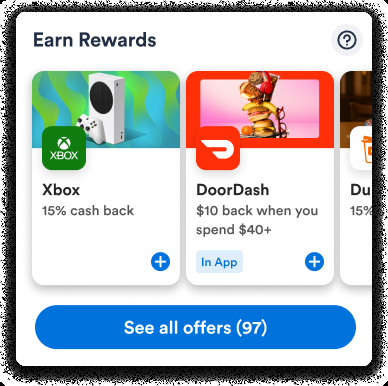 |
"Earn Rewards" will be replaced with the program name you provide to your Cardlytics contact.
User Flow
- User enters your app
- If not logged in:
- Display the Dynamic Widget in logged-out mode.
- The user taps the login action (either your UI or the button on the widget).
- The user completes your login flow.
- Open the full CRP (hosted) and reload the Dynamic Widget into logged-in mode.
- If logged in:
- Display the Dynamic Widget in logged-in mode embedded in your page/app via a webview.
- For
horizontal-carousel, several offer cards are displayed.
- For
- The user taps an offer (or "See all offers", "How it works") inside the widget.
- Open the hosted full CRP in a separate page or webview.
- Display the Dynamic Widget in logged-in mode embedded in your page/app via a webview.
- If not logged in:
Server Setup
You must build a backend endpoint that exchanges your Cardlytics credentials for a session token. The Embedding SDK calls this endpoint via your getSession implementation.
A. Get Your Credentials
Obtain the following values from your Cardlytics contact:
| Key | Description |
|---|---|
client_id | Identifies your integration. |
client_secret | Secret used to authenticate your backend. Never expose this to the browser. |
application_id | Public ID used to initialize the SDK on the client. |
B. Create a Secure Backend Endpoint for Session Token
Build a server-to-server endpoint that calls Cardlytics' startSession API and returns the response to the client.
const express = require('express');
const axios = require('axios');
const router = express.Router();

router.post('/api/get_cardlytics_session', async (req, res) => {
  const payload = {
    clientId: process.env.CARDLYTICS_CLIENT_ID,       // from Step A
    clientSecret: process.env.CARDLYTICS_CLIENT_SECRET // from Step A
  };

  const response = await axios.post(
    'https://publisher-rewards-api.cardlytics.com/v2/session/startSession',
    payload,
    {
      headers: {
        'Content-Type': 'application/json',
        'x-source-customer-id': 'your_obfuscated_customer_id'
      }
    }
  );

  res.json(response.data);
});

module.exports = router;
Always send an obfuscated, non-PII identifier for
x-source-customer-id.
Web Integration
Include the Cardlytics Embedding SDK on every page that renders the widget:
<script src="https://publisher-cdn-us.cardlytics.com/embedding-sdk/v1/cardlytics-embedding-sdk.js"></script>The SDK's create() method returns open, close, and createWidget. Call createWidget() to render the Dynamic Widget.
Web — Logged-out Mode
Use this when your app allows non-logged-in users.
CardlyticsEmbeddingSDK.create() parameters
CardlyticsEmbeddingSDK.create() parameters| Key | Type | Required | Description |
|---|---|---|---|
applicationId | string | Yes | Your application ID provided by Cardlytics. |
getSession | Promise / async function | Yes | Return { isLoggedOut: true } for logged-out mode. |
disablePreload | boolean | No | Set to true if your full CRP is on a separate page (hosted) so it isn't preloaded in this page. |
createWidget() parameters
createWidget() parameters| Key | Type | Description |
|---|---|---|
template | string | Widget appearance. Use 'horizontal-carousel'. Check with your Cardlytics contact for other available values. |
attachTo | string (CSS selector) | The CSS selector of the HTML element to insert the widget into. The widget fills the container. |
actions | object | Configuration for widget interaction callbacks. See actions below. |
actions
actions| Key | Type | Description |
|---|---|---|
login | { onClick(): void } | Called when the user taps a login/sign-in action in the widget. Trigger your auth flow, then call open() to launch the hosted full CRP after the user logs in. |
Example
<script src="https://publisher-cdn-us.cardlytics.com/embedding-sdk/v1/cardlytics-embedding-sdk.js"></script>
<script>
  async function getSessionImplementation() {
    return { isLoggedOut: true };
  }

  const appId = 'your-app-id';

  const { open, createWidget } = CardlyticsEmbeddingSDK.create({
    applicationId: appId,
    disablePreload: true,
    getSession: getSessionImplementation,
  });

  createWidget({
    attachTo: '#widget-container',
    template: 'horizontal-carousel',
    actions: {
      login: {
        onClick() {
          // Trigger your authentication flow.
          // After login succeeds, call open() to launch the hosted full CRP.
          open();
        }
      }
    }
  });
</script>
Add a sized container in your HTML:
<div
  id="widget-container"
  style="width: 340px; height: 350px">
</div>
Web — Logged-in Mode (Hosted full CRP)
Use this once the user is authenticated. getSession should return a real session token from your backend, and you must point the SDK at your hosted full CRP page.
CardlyticsEmbeddingSDK.create() parameters
CardlyticsEmbeddingSDK.create() parameters| Key | Type | Description |
|---|---|---|
applicationId | string | Your application ID. |
getSession | Promise / async function | Called by the SDK whenever a fresh session token is needed. Call your backend endpoint here. |
disablePreload | boolean | Pass true because the hosted full CRP lives on a separate page. |
createWidget() parameters
createWidget() parameters| Key | Type | Description |
|---|---|---|
template | string | e.g. 'horizontal-carousel'. |
attachTo | string (CSS selector) | Container the widget fills. |
target | object | Tells the SDK to open a hosted full CRP. See below. |
actions | object | Interaction callbacks. |
target (hosted)
target (hosted)| Key | Type | Description |
|---|---|---|
type | 'hosted' | Required. |
hostedOrigin | string | The base URL (origin + path) of your hosted full CRP page. |
target: {
  type: 'hosted',
  hostedOrigin: 'https://yourdomain.com/pathname'
}
actions
actions| Key | Type | Description |
|---|---|---|
login | { onClick(): void } | Fallback for when both user tokens expire and refresh fails — the widget shows the logged-out banner. Trigger your auth flow, then call open() after login succeeds. |
Complete example
<script src="https://publisher-cdn-us.cardlytics.com/embedding-sdk/v1/cardlytics-embedding-sdk.js"></script>
<script>
  async function getSessionImplementation() {
    try {
      const response = await fetch(
        '{your_backend_hostname}/api/get_cardlytics_session',
        { method: 'POST' }
      );
      return await response.json();
    } catch (error) {
      console.error('Error fetching session token:', error);
    }
  }

  const appId = 'your-app-id';

  const { open, createWidget } = CardlyticsEmbeddingSDK.create({
    applicationId: appId,
    disablePreload: true,
    getSession: getSessionImplementation,
  });

  createWidget({
    attachTo: '#widget-container',
    template: 'horizontal-carousel',
    target: {
      type: 'hosted',
      hostedOrigin: 'https://yourdomain.com'
    },
    actions: {
      login: {
        onClick() {
          // Trigger your authentication flow
        }
      }
    }
  });
</script><div
id="widget-container"
style="width: 340px; height: 350px">
</div>Switching Between Modes on the Same Page
createWidget() returns a destroy() function so you can swap from logged-in to logged-out (or vice versa) without a full page reload.
async function getSessionImplementation() {
  if (isLoggedIn) {
    try {
      const response = await fetch(
        '{your_backend_hostname}/api/get_cardlytics_session',
        { method: 'POST' }
      );
      return await response.json();
    } catch (error) {
      console.error('Error fetching session token:', error);
    }
  } else {
    return { isLoggedOut: true };
  }
}

const appId = 'your-app-id';

const { open, createWidget } = CardlyticsEmbeddingSDK.create({
  applicationId: appId,
  disablePreload: true,
  getSession: getSessionImplementation,
});

let currentDestroy = null;

const initWidget = () => {
  if (currentDestroy) {
    currentDestroy();
  }

  const { destroy } = createWidget({
    attachTo: '#widget-container',
    template: 'horizontal-carousel',
    actions: {
      login: {
        onClick: async () => {
          // Trigger your authentication flow
          // After login succeeds:
          initWidget();
          open();
        }
      }
    }
  });

  currentDestroy = destroy;
};

initWidget();
Mobile App Integration
For mobile apps, deploy two HTML pages on a publicly accessible HTTPS domain you control — one for the logged-out widget, one for the logged-in widget — and embed each in a native webview. The full CRP runs in a separate webview because disablePreload: true is required.
Recommended minimum container size for
horizontal-carousel: 340×350.
| Template | Min width | Min height |
|---|---|---|
horizontal-carousel | 340 px | 350 px |
iOS — Logged-out Mode
A. Build the virtual webpage
<script src="https://publisher-cdn-us.cardlytics.com/embedding-sdk/v1/cardlytics-embedding-sdk.js"></script>
<script>
  async function getSessionImplementation() {
    return { isLoggedOut: true };
  }

  const appId = 'your-app-id';

  const { createWidget } = CardlyticsEmbeddingSDK.create({
    applicationId: appId,
    disablePreload: true,
    getSession: getSessionImplementation,
    platform: 'ios',
  });

  createWidget({
    attachTo: '#widget-container',
    template: 'horizontal-carousel',
    actions: {
      login: {
        onClick() {
          MobileApp.onLogin();
        }
      }
    }
  });
</script><div
id="widget-container"
style="position: fixed; top: 0; left: 0; width: 100%; height: 100vh">
</div>B. Pass events to the mobile app (Swift)
let userContentController = WKUserContentController()
userContentController.add(context.coordinator, name: "MobileApp")

let mobileAppScript = """
  window.MobileApp = {
    onLogin: function(params) {
      var message = { action: 'onLogin', params: params || {} };
      window.webkit.messageHandlers.MobileApp.postMessage(message);
    }
  };
"""

let userScript = WKUserScript(
  source: mobileAppScript,
  injectionTime: .atDocumentStart,
  forMainFrameOnly: false
)
userContentController.addUserScript(userScript)func userContentController(_ userContentController: WKUserContentController,
didReceive message: WKScriptMessage) {
guard message.name == "MobileApp",
let body = message.body as? [String: Any],
let action = body["action"] as? String else { return }
switch action {
case "onLogin":
DispatchQueue.main.async {
// Trigger your native authentication flow
}
default:
break
}
}C. Open the Dynamic Widget in a webview
struct WidgetWebView: UIViewRepresentable {
  let isLoggedIn: Bool
  let onLogin: () -> Void

  func makeUIView(context: Context) -> WKWebView {
    let userContentController = WKUserContentController()
    userContentController.add(context.coordinator, name: "MobileApp")

    let mobileAppScript = """
      window.MobileApp = {
        onLogin: function(params) {
          var message = { action: 'onLogin', params: params || {} };
          window.webkit.messageHandlers.MobileApp.postMessage(message);
        }
      };
    """
    let userScript = WKUserScript(
      source: mobileAppScript,
      injectionTime: .atDocumentStart,
      forMainFrameOnly: false
    )
    userContentController.addUserScript(userScript)

    let configuration = WKWebViewConfiguration()
    configuration.preferences.javaScriptEnabled = true
    configuration.defaultWebpagePreferences.allowsContentJavaScript = true
    configuration.userContentController = userContentController
    // Use a non-persistent data store for the logged-out state so session
    // cookies are NOT shared.
    configuration.websiteDataStore = WKWebsiteDataStore.nonPersistent()

    let webView = WKWebView(frame: .zero, configuration: configuration)
    webView.scrollView.isScrollEnabled = false

    if let url = URL(string: "https://{your_domain}/dynamic-widget-logged-out") {
      webView.load(URLRequest(url: url))
    }
    return webView
  }

  func updateUIView(_ uiView: WKWebView, context: Context) {}

  func makeCoordinator() -> Coordinator { Coordinator(onLogin: onLogin) }

  class Coordinator: NSObject, WKScriptMessageHandler {
    let onLogin: () -> Void
    init(onLogin: @escaping () -> Void) { self.onLogin = onLogin }

    func userContentController(_ userContentController: WKUserContentController,
                               didReceive message: WKScriptMessage) {
      guard message.name == "MobileApp",
            let body = message.body as? [String: Any],
            let action = body["action"] as? String else { return }
      switch action {
      case "onLogin":
        DispatchQueue.main.async { self.onLogin() }
      default:
        break
      }
    }
  }
}
Set the container size:
WidgetWebView(isLoggedIn: false, onLogin: { /* trigger your auth flow */ })
  .frame(width: 340, height: 350)
  .clipped()
  .cornerRadius(8)
D. After login, switch into logged-in mode
Recreate the webview pointing at the logged-in URL.
@State private var widgetReloadID: Int = 0
@State private var isLoggedIn: Bool = false

// After successful authentication and session creation:
isLoggedIn = true
widgetReloadID += 1 // Forces SwiftUI to recreate WidgetWebView with updated isLoggedInWidgetWebView(isLoggedIn: isLoggedIn, onLogin: { /* trigger your auth flow */ })
.id(widgetReloadID) // SwiftUI recreates the view whenever this value changes
.frame(width: 340, height: 350)
.clipped()
.cornerRadius(8)iOS — Logged-in Mode
A. Build the virtual webpage
In addition to login, the logged-in widget exposes offerDetail, howItWorks, and offers actions. Forward each set of params to your full CRP webview so it deep-links to the right page.
| Action | Description |
|---|---|
login | Fallback when token refresh fails. Trigger your native auth flow. |
offerDetail | User tapped a specific offer. Open the full CRP and forward params so the offer detail page is shown. |
howItWorks | User tapped "How it works". Open the full CRP and forward params to deep-link to the explainer. |
offers | User tapped "See all offers". Open the full CRP. |
<script src="https://publisher-cdn-us.cardlytics.com/embedding-sdk/v1/cardlytics-embedding-sdk.js"></script>
<script>
  async function getSessionImplementation() {
    // Call the backend endpoint you implemented in Server Setup.
    const response = await fetch(
      '{your_backend_hostname}/api/get_cardlytics_session',
      { method: 'POST' }
    );
    return await response.json();
  }

  const appId = 'your-app-id';

  const { createWidget } = CardlyticsEmbeddingSDK.create({
    applicationId: appId,
    disablePreload: true,
    getSession: getSessionImplementation,
    platform: 'ios',
  });

  createWidget({
    attachTo: '#widget-container',
    template: 'horizontal-carousel',
    actions: {
      login: {
        onClick() { MobileApp.onLogin(); }
      },
      offerDetail: {
        onClick(params) {
          MobileApp.onCardlyticsOpenFullCRP(JSON.stringify(params));
        }
      },
      howItWorks: {
        onClick(params) {
          MobileApp.onCardlyticsOpenFullCRP(JSON.stringify(params));
        }
      },
      offers: {
        onClick(params) {
          MobileApp.onCardlyticsOpenFullCRP(JSON.stringify(params));
        }
      }
    }
  });
</script><div
id="widget-container"
style="position: fixed; top: 0; left: 0; width: 100%; height: 100vh">
</div>B. Pass events to the mobile app (Swift)
Define the JavaScript bridge:
let userContentController = WKUserContentController()
userContentController.add(context.coordinator, name: "MobileApp")

let mobileAppScript = """
  window.MobileApp = {
    onLogin: function(params) {
      var message = { action: 'onLogin', params: params || {} };
      window.webkit.messageHandlers.MobileApp.postMessage(message);
    },
    onCardlyticsOpenFullCRP: function(params) {
      var message = { action: 'onCardlyticsOpenFullCRP', params: params };
      window.webkit.messageHandlers.MobileApp.postMessage(message);
    }
  };
"""

let userScript = WKUserScript(
  source: mobileAppScript,
  injectionTime: .atDocumentStart,
  forMainFrameOnly: false
)
userContentController.addUserScript(userScript)
Handle the events:
func userContentController(_ userContentController: WKUserContentController,
                           didReceive message: WKScriptMessage) {
  guard message.name == "MobileApp",
        let body = message.body as? [String: Any],
        let action = body["action"] as? String else { return }

  switch action {
  case "onLogin":
    DispatchQueue.main.async {
      // Trigger your native authentication flow
    }
  case "onCardlyticsOpenFullCRP":
    let contextJson = body["params"] as? String ?? ""
    DispatchQueue.main.async {
      // Open the full CRP webview, forwarding contextJson as the `context` param
    }
  default:
    break
  }
}
C. Open the Dynamic Widget in a webview
struct WidgetWebView: UIViewRepresentable {
  let isLoggedIn: Bool
  let onLogin: () -> Void
  let onCardlyticsOpenFullCRP: (String) -> Void

  func makeUIView(context: Context) -> WKWebView {
    let userContentController = WKUserContentController()
    userContentController.add(context.coordinator, name: "MobileApp")

    let mobileAppScript = """
      window.MobileApp = {
        onLogin: function(params) {
          var message = { action: 'onLogin', params: params || {} };
          window.webkit.messageHandlers.MobileApp.postMessage(message);
        },
        onCardlyticsOpenFullCRP: function(params) {
          // params is a JSON string (already serialized by the HTML)
          var message = { action: 'onCardlyticsOpenFullCRP', params: params };
          window.webkit.messageHandlers.MobileApp.postMessage(message);
        }
      };
    """
    let userScript = WKUserScript(
      source: mobileAppScript,
      injectionTime: .atDocumentStart,
      forMainFrameOnly: false
    )
    userContentController.addUserScript(userScript)

    let configuration = WKWebViewConfiguration()
    configuration.preferences.javaScriptEnabled = true
    configuration.defaultWebpagePreferences.allowsContentJavaScript = true
    configuration.userContentController = userContentController
    // Use the default data store so logged-in session cookies are shared
    // with the full CRP webview.
    configuration.websiteDataStore = WKWebsiteDataStore.default()

    let webView = WKWebView(frame: .zero, configuration: configuration)
    webView.scrollView.isScrollEnabled = false

    if let url = URL(string: "https://{your_domain}/dynamic-widget-logged-in") {
      webView.load(URLRequest(url: url))
    }
    return webView
  }

  func updateUIView(_ uiView: WKWebView, context: Context) {}

  func makeCoordinator() -> Coordinator {
    Coordinator(onLogin: onLogin, onCardlyticsOpenFullCRP: onCardlyticsOpenFullCRP)
  }

  class Coordinator: NSObject, WKScriptMessageHandler {
    let onLogin: () -> Void
    let onCardlyticsOpenFullCRP: (String) -> Void

    init(onLogin: @escaping () -> Void,
         onCardlyticsOpenFullCRP: @escaping (String) -> Void) {
      self.onLogin = onLogin
      self.onCardlyticsOpenFullCRP = onCardlyticsOpenFullCRP
    }

    func userContentController(_ userContentController: WKUserContentController,
                               didReceive message: WKScriptMessage) {
      guard message.name == "MobileApp",
            let body = message.body as? [String: Any],
            let action = body["action"] as? String else { return }
      switch action {
      case "onLogin":
        DispatchQueue.main.async { self.onLogin() }
      case "onCardlyticsOpenFullCRP":
        // params is already a JSON string — no need to re-serialize
        let contextJson = body["params"] as? String ?? ""
        DispatchQueue.main.async { self.onCardlyticsOpenFullCRP(contextJson) }
      default:
        break
      }
    }
  }
}
Set the container size:
WidgetWebView(
  isLoggedIn: true,
  onLogin: { /* trigger your auth flow */ },
  onCardlyticsOpenFullCRP: { contextJson in
    /* open full CRP with contextJson (JSON string) */
  }
)
.frame(width: 340, height: 350)
.clipped()
.cornerRadius(8)
Android — Logged-out Mode
A. Build the virtual webpage
<script src="https://publisher-cdn-us.cardlytics.com/embedding-sdk/v1/cardlytics-embedding-sdk.js"></script>
<script>
  async function getSessionImplementation() {
    return { isLoggedOut: true };
  }

  const appId = 'your-app-id';

  const { createWidget } = CardlyticsEmbeddingSDK.create({
    applicationId: appId,
    disablePreload: true,
    getSession: getSessionImplementation,
    platform: 'android',
  });

  createWidget({
    attachTo: '#widget-container',
    template: 'horizontal-carousel',
    actions: {
      login: {
        onClick() { MobileApp.onLogin(); }
      }
    }
  });
</script><div
id="widget-container"
style="position: fixed; top: 0; left: 0; width: 100%; height: 100vh">
</div>B. Pass events to the mobile app (Java)
private class WidgetMobileAppInterface {
  @JavascriptInterface
  public void onLogin() {
    runOnUiThread(() -> {
      // Trigger your native authentication flow
    });
  }
}
Register the interface before loadUrl:
webView.addJavascriptInterface(new WidgetMobileAppInterface(), "MobileApp");C. Open the Dynamic Widget in a WebView
Declare the WebView in your layout XML:
<WebView
  android:id="@+id/widgetWebView"
  android:layout_width="340dp"
  android:layout_height="350dp" />
Configure and load the logged-out URL in your Activity:
WebView widgetWebView = findViewById(R.id.widgetWebView);
widgetWebView.getSettings().setJavaScriptEnabled(true);
widgetWebView.getSettings().setDomStorageEnabled(true);

widgetWebView.addJavascriptInterface(new WidgetMobileAppInterface(), "MobileApp");

widgetWebView.loadUrl("https://{your_domain}/dynamic-widget-logged-out");
D. After login, switch into logged-in mode
After the user authenticates, load the logged-in URL. Make sure session cookies are flushed into the WebView's CookieManager before calling loadUrl so the logged-in page can read them:
private void loadWidgetLoggedIn() {
  CookieManager.getInstance().setAcceptCookie(true);
  CookieManager.getInstance().flush();

  widgetWebView.loadUrl("https://{your_domain}/dynamic-widget-logged-in");
}

// After successful authentication and session creation:
loadWidgetLoggedIn();
Android — Logged-in Mode
A. Build the virtual webpage
<script src="https://publisher-cdn-us.cardlytics.com/embedding-sdk/v1/cardlytics-embedding-sdk.js"></script>
<script>
  async function getSessionImplementation() {
    const response = await fetch(
      '{your_backend_hostname}/api/get_cardlytics_session',
      { method: 'POST' }
    );
    return await response.json();
  }

  const appId = 'your-app-id';

  const { createWidget } = CardlyticsEmbeddingSDK.create({
    applicationId: appId,
    disablePreload: true,
    getSession: getSessionImplementation,
    platform: 'android',
  });

  createWidget({
    attachTo: '#widget-container',
    template: 'horizontal-carousel',
    actions: {
      login: {
        onClick() { MobileApp.onLogin(); }
      },
      offerDetail: {
        onClick(params) {
          MobileApp.onCardlyticsOpenFullCRP(JSON.stringify(params));
        }
      },
      howItWorks: {
        onClick(params) {
          MobileApp.onCardlyticsOpenFullCRP(JSON.stringify(params));
        }
      },
      offers: {
        onClick(params) {
          MobileApp.onCardlyticsOpenFullCRP(JSON.stringify(params));
        }
      }
    }
  });
</script><div
id="widget-container"
style="position: fixed; top: 0; left: 0; width: 100%; height: 100vh">
</div>B. Pass events to the mobile app (Java)
private class WidgetMobileAppInterface {
  @JavascriptInterface
  public void onLogin() {
    runOnUiThread(() -> {
      // Trigger your native authentication flow
    });
  }

  @JavascriptInterface
  public void onCardlyticsOpenFullCRP(String contextJson) {
    runOnUiThread(() -> {
      // Open the full CRP Activity/WebView and forward contextJson
    });
  }
}
Register the interface before loadUrl:
webView.addJavascriptInterface(new WidgetMobileAppInterface(), "MobileApp");C. Open the Dynamic Widget in a WebView
<WebView
  android:id="@+id/widgetWebView"
  android:layout_width="340dp"
android:layout_height="350dp" />WebView widgetWebView = findViewById(R.id.widgetWebView);
widgetWebView.getSettings().setJavaScriptEnabled(true);
widgetWebView.getSettings().setDomStorageEnabled(true);
CookieManager.getInstance().setAcceptCookie(true);
CookieManager.getInstance().setAcceptThirdPartyCookies(widgetWebView, true);
widgetWebView.addJavascriptInterface(new WidgetMobileAppInterface(), "MobileApp");
widgetWebView.loadUrl("https://{your_domain}/dynamic-widget-logged-in");Theme Selection
The Dynamic Widget supports two background types:
white— neutral background, used by default and for the logged-out fallback banner.primary— uses the primary color you provide to your Cardlytics contact to generate a branded background.
Let your Cardlytics contact know which theme you prefer for each template.
| Template | Background — primary(logged In) | Background — white (logged-out fallback) |
|---|---|---|
horizontal-carousel | 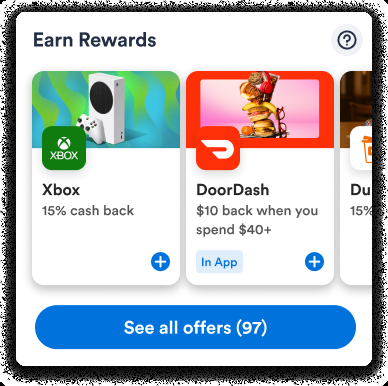 | 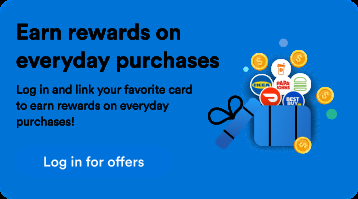 |
"Earn Rewards" will be replaced with the program name you provide to your Cardlytics contact.
Appendix: Hosted Full CRP Page
Your hosted full CRP page receives a context parameter (forwarded from the widget's offerDetail, howItWorks, or offers actions) and uses it to deep-link to the right screen.
The
startAccountLinkcallback is only required when using Plaid processor mode.
<script src="https://publisher-cdn-us.cardlytics.com/embedding-sdk/v1/cardlytics-embedding-sdk.js"></script>
<script>
  async function getSessionImplementation() {
    // See implementation in the Server Setup section
  }

  // Only required for Plaid processor mode
  async function startAccountLinkImplementation({ context }) {
    // See implementation in the full embedded SDK Plaid processor integration doc
  }

  // The context object originally passed to startAccountLink (before Plaid linking
  // started) should be forwarded into this page after Plaid linking completes.
  // You don't have to use URL search params — any transport works.
  const contextFromUrl = JSON.parse(
    new URLSearchParams(window.location.search).get('context')
  );

  const { open, close } = CardlyticsEmbeddingSDK.create({
    applicationId: 'your_application_id',
    getSession: getSessionImplementation,
    // Only required for Plaid processor mode
    startAccountLink: startAccountLinkImplementation,
    platform: 'ios',
    context: contextFromUrl,
  });

  open();
</script>
Need Help?
If you run into issues during integration, contact your Cardlytics representative with your applicationId, the page or screen where the issue occurs, and any console/logcat output.
Updated 6 months ago